
What it does
Send WooCommerce order emails to a different email address depending on what was purchased. GoUp Conditional Order Email Recipients routes WooCommerce order emails to the branches, warehouses, or internal teams responsible for what was purchased. Build product and category rules, choose the WooCommerce email events they apply to, and add or replace To, CC, and BCC recipients without changing the order itself.
Step-by-step guide: How to Send WooCommerce New Order Emails to Different Email Addresses by Product or Category
Screenshots
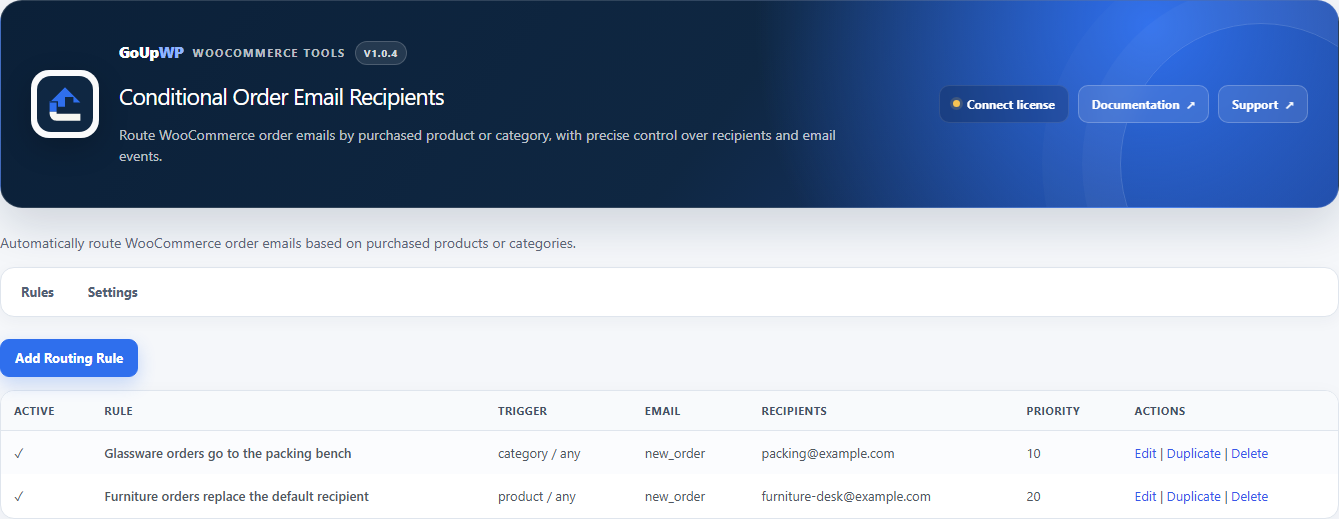

Common use cases
- Route customized-product orders to a print or production department
- Notify a florist team whenever an order contains products from the Flowers category
- Send selected product orders to the branch responsible for fulfilment
- Copy a central operations inbox on selected order-status emails
Features
- Match products or product categories with optional child-category and variation support
- Choose WooCommerce email events and add or replace To, CC, and BCC recipients
- Combine ANY/ALL matching, priorities, and stop-processing behavior
- Preserve WooCommerce email templates while changing operational recipients
- Test rules with an existing order and move configurations with JSON import/export
- Keep order and customer data on your WordPress site with no telemetry or GoUp cloud dependency
How it works
- Download the plugin ZIP from your GoUpWP account.
- In WordPress, open Plugins → Add New → Upload Plugin, then install and activate it.
- Open WooCommerce → GoUp Email Routing and create a routing rule.
- Test the rule with an existing order ID before enabling it for live emails.
Compatibility and requirements
Frequently asked questions
How do I send WooCommerce new order emails to a different address for certain products?
Create a rule that matches the product or category, choose the New Order email (or any other WooCommerce email event), and enter the address that should receive it. You can add it alongside the default recipient or replace the recipient entirely—no code snippet required.
Does the plugin change WooCommerce orders?
No. It reads orders through WooCommerce APIs. Matched-product-only emails use temporary filters and do not save changes to the order.
Can one order notify several recipients?
Yes. Multiple matching rules can route the same order to the relevant To, CC, or BCC recipients. Priorities and stop processing give you control when rules overlap.
Does this create separate supplier messages?
No. This plugin changes recipients on selected WooCommerce order emails. Use GoUp Supplier Order Notifications when each supplier needs a separate message containing only its own line items.
Does it support HPOS and orders created through Checkout Blocks?
Yes. The plugin uses WooCommerce order APIs, declares HPOS compatibility, and works at the order and email layer without depending on classic checkout rendering.
How do the GoUp email plugins work together?
Each plugin evaluates its own focused routing rules. Recipient-routing plugins adjust their intended WooCommerce messages, while Supplier Order Notifications sends separate supplier-specific messages; test overlapping rules with a representative order before launch.
Customer reviews
No reviews yet. Reviews come only from customers who hold a license for this plugin.
Updates, support, and cancellation
Every license covers one production website plus one staging or local development site, and includes maintained releases, automatic updates, fresh downloads, and product support during its term. Annual licenses renew automatically until cancelled. Two-year licenses are prepaid and renewed manually; lifetime licenses never expire. If a fixed-term license ends, your installed plugin continues working at its current version.
Changelog
1.0.5 27 September 2026 · tested with WordPress 7.1
- Data integrity: new rules always receive unique IDs, while existing empty or duplicate IDs are repaired once without losing rules.
- Rule quality: enabled rules now validate names, products/categories, WooCommerce email types and recipient requirements; full/add rules may route through CC/BCC without forcing a To override.
- Matched-only privacy: hide customer notes and line prices unless enabled, omit full-order attachments and Reply-To data by default, and prevent restricted recipients from leaking into the full-order message.
- Reliability: consume routing header state once, prevent duplicate matched-only sends within a request, support string and array headers, preserve original delivery on routing failures, and reject malformed filter output.
- Import security: verify PHP upload status and actual size, enforce the schema and a 500-rule ceiling, disable unavailable imported rules, and prevent an all-invalid import from overwriting working rules.
- Performance: cache normalized rules, order/product/category context and descendant-category sets across rule evaluation in the same request.
- Delivery safety: deduplicate recipients across To/CC/BCC, cap rules at 100 recipients and each email at 200, tighten target-order permissions, logging context and admin asset loading.
1.0.4 26 September 2026 · tested with WordPress 7.1
- GoUpWP admin identity: every plugin screen now opens with a GoUpWP header showing the plugin name, version, documentation, support and licence status.
- GoUpWP styling for settings, rule tables, tabs, cards and buttons, scoped to this plugin's screens so WordPress and other plugins are untouched.
- GoUpWP mark on the Plugins screen, Documentation and Support links in the plugin row, and GoUpWP icons on the Dashboard → Updates screen.
1.0.3 20 September 2026 · tested with WordPress 7.1
- Updates: the installer now fetches a freshly signed download link at install time and verifies the SHA-256 checksum, so "Update now" works hours after WordPress last checked for updates.
- Updates: update checks are cached for six hours and the Plugins screen shows a clear message (with a link to the license page) when an update exists but the license is not active.
- License screen: named per plugin in the WooCommerce menu, shows the installed version and a "Check for updates" button, and every string is translatable.
- Plugins screen: Settings and License links on the plugin row.
- Uninstall: releases the license seat on goupwp.com and removes all license data, regardless of the data-retention setting.
- Code style: all source files expanded to readable, documented PHP.
- Fixed CC and BCC recipients never being added: the plugin hooked a WooCommerce filter that does not exist. Recipients configured as CC/BCC now receive the routed emails.
- Email filters attach when WooCommerce builds its mailer instead of loading every email class on each storefront request.
1.0.2 20 September 2026 · tested with WordPress 7.1
- License screen now explains activation failures (unrecognised key, wrong plugin, site limit reached, expired) and shows the environment, activation counts and end date.
- Activate and Deactivate always contact goupwp.com immediately instead of waiting out a network backoff.
1.0.1 20 September 2026 · tested with WordPress 7.1
Release 1.0.1.