
WooCommerce shipping zones cannot see product categories, so to disable a shipping method for a specific category you either hook woocommerce_package_rates, loop over $package['contents'], and unset rates whose method_id matches when a product has the category term — or install GoUp Shipping Method by Category and create a rule: pick the categories, choose an instance or method type, choose Disable or Allow only. The plugin filters rates server-side so it works with the Cart and Checkout Blocks and shipping classes stay untouched.
Key takeaways
- WooCommerce shipping zones know where a parcel goes, not what is in it, so there is no per-category shipping method setting.
- Shipping classes change Flat Rate prices but cannot hide a method, and Free Shipping ignores them.
- Filter woocommerce_package_rates, check each item's parent product_id with has_term(), and unset the rates by method_id (type) or rate ID (instance).
- WooCommerce caches rates per package in the session: change the address or empty the cart after editing a snippet.
Shipping zones in WooCommerce know where a parcel is going, not what is in it. That is why "disable free shipping for the furniture category" or "pickup only for fresh food" cannot be configured under WooCommerce → Settings → Shipping. Shipping classes get you part of the way for pricing, but they cannot remove a method. This guide shows how to disable or restrict a shipping method for a specific product category using the woocommerce_package_rates filter, and how to do the same without code using GoUp Shipping Method by Category.
What shipping classes can and cannot do
A shipping class is a label on a product that a Flat Rate method can use to add a per-class cost. It can make furniture more expensive to ship. It cannot:
- hide Free Shipping when furniture is in the cart (Free Shipping ignores classes),
- hide a courier method for a category,
- force "Local pickup only" for perishable goods.
Those all require filtering the rates after WooCommerce has calculated them, which is what woocommerce_package_rates is for.
Option 1: Hide a shipping method for a category with a snippet
This snippet removes every Free Shipping rate when any item in the package belongs to the furniture category, and removes everything except Local Pickup when an item is in fresh-food.
add_filter( 'woocommerce_package_rates', function ( $rates, $package ) {
    $has_furniture = false;
    $has_fresh     = false;

    foreach ( $package['contents'] as $item ) {
        $product_id = $item['product_id']; // parent ID, so variations inherit the category
        if ( has_term( 'furniture', 'product_cat', $product_id ) ) {
            $has_furniture = true;
        }
        if ( has_term( 'fresh-food', 'product_cat', $product_id ) ) {
            $has_fresh = true;
        }
    }

    foreach ( $rates as $rate_id => $rate ) {
        if ( $has_furniture && 'free_shipping' === $rate->method_id ) {
            unset( $rates[ $rate_id ] );
        }
        if ( $has_fresh && 'local_pickup' !== $rate->method_id && 'pickup_location' !== $rate->method_id ) {
            unset( $rates[ $rate_id ] );
        }
    }

    return $rates;
}, 10, 2 );
$rate->method_id is the method type (flat_rate, free_shipping, local_pickup, pickup_location); $rate_id is the instance (flat_rate:3). Use the instance to target one zone's method and the type to target all of them.
WooCommerce caches calculated rates in the session keyed by a hash of the package. After adding or editing the snippet, change the address or empty the cart so a fresh calculation runs — otherwise you will think it "does not work".
Where snippets fall short
- Category slugs and rate IDs are hard-coded; a renamed category silently disables the rule.
- Child categories are not matched unless you add
get_term_children()logic. - A mistake can leave a package with zero rates and WooCommerce shows "No shipping options were found".
- Multiple packages (split shipments, vendor marketplaces) need per-package logic most snippets get wrong.
Option 2: Disable shipping methods by category without code
GoUp Shipping Method by Category lives under WooCommerce → Shipping by Category. A rule takes a minute:
- Rules → Add rule.
- Categories: pick one or more; tick Include child categories to cover sub-categories.
- Match: ANY (one item from any selected category triggers the rule) or ALL (every selected category must be represented by a shippable product in the package).
- Target: Instance (specific zone methods, including Checkout Block pickup locations) or Type (every Free Shipping, every Flat Rate, every Local Pickup).
- Action: Disable the selected methods, or Allow only the selected methods.
- Priority orders evaluation; every matching rule applies. Save.
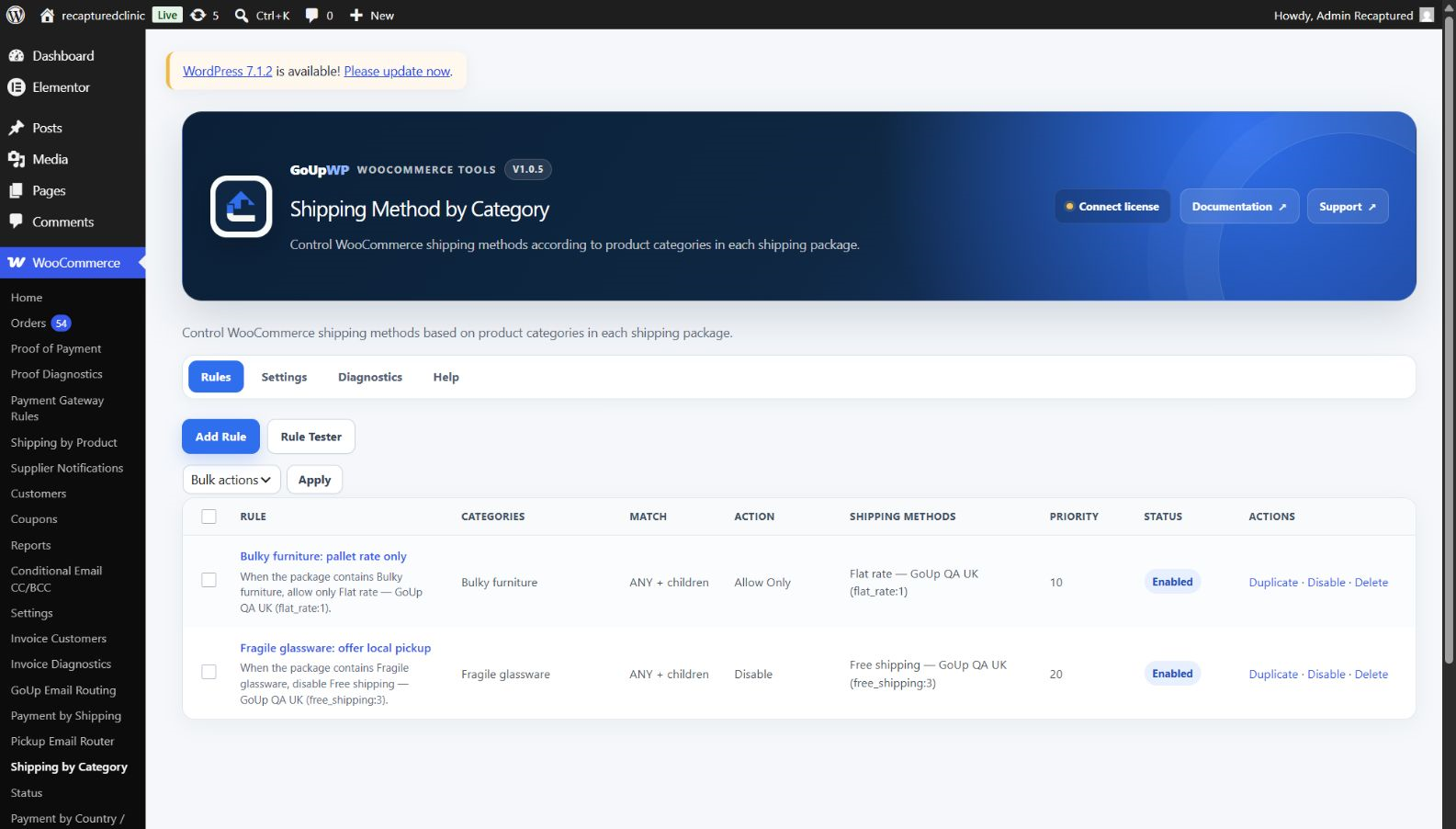
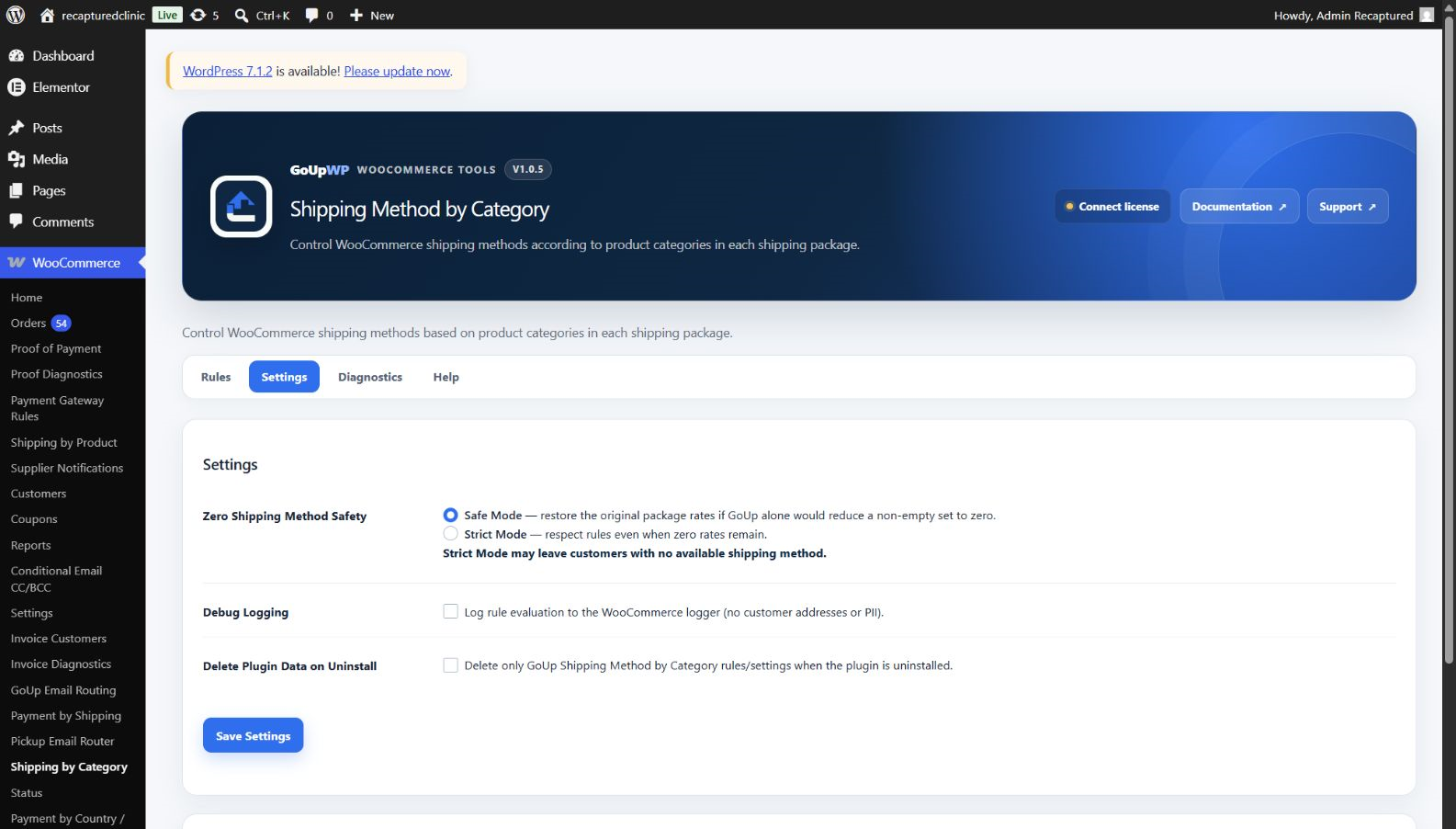
The plugin only filters rates WooCommerce has already calculated. It does not change prices, labels, taxes or delivery metadata, and it does not replace your shipping zones — so it coexists with table-rate and carrier plugins that return standard rates. Each package is evaluated separately, so split shipments behave correctly. Safety mode (Safe by default) restores the original rates if the rules would leave none, and the rate cache is invalidated automatically whenever rules change.
Price: $12 per year for one production site plus one staging site, or $49 lifetime. Documentation · Pricing.
Common category shipping rules
| Goal | Rule |
|---|---|
| No free shipping on bulky furniture | Categories: Furniture → Type: Free shipping → Disable |
| Fresh food is collection only | Categories: Fresh food → Type: Local pickup → Allow only |
| Freight only for pallets | Categories: Pallets → Instance: "Pallet freight" → Allow only |
| Hazardous goods cannot use Royal Mail | Categories: Aerosols → Instance: "Royal Mail 48" → Disable |
| Wholesale category excluded from express | Categories: Wholesale (with children) → Type: "Next day" instances → Disable |
Snippet vs plugin
| Snippet | GoUp Shipping Method by Category | |
|---|---|---|
| Child categories | Manual | Checkbox |
| Instance or type targeting | Both, by ID | Both, by name |
| Split packages | Depends on your code | Per package |
| Zero-rate protection | None | Safe mode |
| Cache invalidation | Manual | Automatic |
| Cost | Free + dev time | $12/year |
Troubleshooting
"No shipping options were found" after adding the rule. Every rate was removed. Check whether an Allow only rule references a method that does not exist in that zone. GoUp's Safe mode prevents this; a snippet does not.
Rule applies on the cart page but not in the Checkout Block. The snippet is probably hooked to a classic template action. woocommerce_package_rates runs for the Store API too — move the logic there.
Variations are not matched. Check product_id (parent) rather than variation_id; categories live on the parent product.
Related guides
- Disable shipping methods for specific products or variations
- Hide payment methods by shipping method
- Disable a payment method for specific products or categories
- All WooCommerce shipping plugins
Summary
To disable a shipping method for a product category in WooCommerce, filter the calculated rates with woocommerce_package_rates and unset methods when the category is in the package. Shipping classes will not do it. The snippet above handles two fixed categories well; child categories, split packages, renamed rate instances and the risk of leaving a package with no rates at all are where a rules plugin with a safety mode earns its place.
Frequently asked questions
How do I exclude a product category from free shipping in WooCommerce?
Hook woocommerce_package_rates and unset any rate whose method_id is free_shipping when a cart item has the category, or use GoUp Shipping Method by Category with Categories = the category, Target = Type: Free shipping, Action = Disable. Shipping classes cannot do this because a class cannot remove a method, only change its price.
Can't I just use shipping classes for this?
Shipping classes adjust the cost of Flat Rate per class; they cannot hide a method, and Free Shipping ignores classes entirely. For hiding or restricting methods you need the package-rates filter or a plugin built on it.
Does this work with the WooCommerce Cart and Checkout Blocks?
Yes. Both blocks fetch rates from the Store API, which runs woocommerce_package_rates. GoUp filters server-side through that hook, so blocks and classic pages behave the same.
What if the rule removes every shipping method?
GoUp's Safety mode (Safe, the default) restores the package's original rates and logs a warning; Strict keeps the empty result if you really want 'no shipping available'. A snippet has no safety net, so a bad rule can block checkout.
Why does the rule not apply immediately after I save it?
WooCommerce caches shipping rates per package hash in the session. GoUp invalidates the cache automatically when rules change; with a snippet, empty the cart or change the shipping address to force recalculation.