
WooCommerce has no per-product shipping method setting. To disable a shipping method for a specific product, hook woocommerce_package_rates, check each $package['contents'] item's product_id or variation_id, and unset the rates you want to hide. Without code, install GoUp Shipping Method by Product: search the product or variation, choose an instance or method type, pick Disable or Allow only. Rates are filtered server-side, so it works with the Cart and Checkout Blocks.
Key takeaways
- WooCommerce has no per-product shipping method setting: a product only has weight, dimensions and a shipping class.
- Filter woocommerce_package_rates and compare each item's product_id (parent) or variation_id to your list, then unset the rates to hide.
- Keep both local_pickup and pickup_location when forcing collection, so classic pickup and Checkout Block pickup locations both survive.
- With Allow only, the whole package is limited to the allowed methods — the oversized or fragile item decides delivery for the cart.
Some products simply cannot go through every shipping method. A framed mirror cannot use the letterbox service. A 40 kg gym bench needs the pallet courier. A product sold from one physical shop is collection only. WooCommerce's answer — shipping classes — changes the price of Flat Rate but cannot remove a method, and Free Shipping ignores classes altogether. This guide shows how to disable or restrict shipping methods for specific products or variations in WooCommerce, with a woocommerce_package_rates snippet and with GoUp Shipping Method by Product.
Product-level shipping options WooCommerce does not have
Under Product → Shipping you get weight, dimensions and a shipping class. Nothing there says "hide method X for this product". The filter that decides which rates the customer sees runs after all methods have calculated, and it is called woocommerce_package_rates. Every solution below hooks that filter.
Option 1: Disable a shipping method for a product with a snippet
This example makes product 456 local-pickup only and removes the "Letterbox" flat-rate instance (flat_rate:12) when variation 789 is in the cart.
add_filter( 'woocommerce_package_rates', function ( $rates, $package ) {
    $pickup_only_products = array( 456 );
    $no_letterbox_variations = array( 789 );

    $force_pickup = false;
    $hide_letterbox = false;

    foreach ( $package['contents'] as $item ) {
        if ( in_array( (int) $item['product_id'], $pickup_only_products, true ) ) {
            $force_pickup = true;
        }
        if ( in_array( (int) $item['variation_id'], $no_letterbox_variations, true ) ) {
            $hide_letterbox = true;
        }
    }

    foreach ( $rates as $rate_id => $rate ) {
        if ( $force_pickup && ! in_array( $rate->method_id, array( 'local_pickup', 'pickup_location' ), true ) ) {
            unset( $rates[ $rate_id ] );
        }
        if ( $hide_letterbox && 'flat_rate:12' === $rate_id ) {
            unset( $rates[ $rate_id ] );
        }
    }

    return $rates;
}, 10, 2 );
product_id is always the parent; variation_id is 0 for simple products. $rate_id is the instance (flat_rate:12) and $rate->method_id is the type (flat_rate). The Checkout Block's native pickup locations use the pickup_location method type, which the snippet keeps alongside classic local_pickup.
Remember that WooCommerce caches rates per package in the session. Change the address or empty the cart after editing the snippet to see the effect.
Why product snippets age badly
- Product IDs change when products are re-imported or duplicated.
- Merchandisers cannot see or edit the rule — every change is a developer ticket.
- Nothing stops a rule from removing every rate and blocking checkout.
- Multi-package carts (marketplace or per-vendor shipping) need per-package care.
Option 2: Disable shipping methods by product without code
GoUp Shipping Method by Product adds WooCommerce → Shipping by Product:
- Rules → Add rule.
- Products: search by name, SKU or ID. Select parent products (which match all their variations) or individual variations. Match: ANY or ALL selected products must be in the package.
- Target: Instance (specific zone methods, including Checkout Block pickup locations) or Type (every Free Shipping, every Local Pickup, and so on).
- Action: Disable the selected methods, or Allow only the selected methods.
- Priority orders evaluation; every matching rule applies. Save.

Rates are filtered server-side through the same package-rate lifecycle the Cart and Checkout Blocks use, so classic and block checkouts behave identically. The plugin does not touch prices, labels or your shipping zones. Safety mode (Safe, the default) restores all rates if your rules would leave none; Strict shows none when that is intentional. WooCommerce's shipping-rate cache is invalidated automatically whenever rules change, and rules export/import as JSON.
Price: $12 per year, one production site plus one staging site, or $49 lifetime. Documentation · Pricing.
Typical per-product shipping rules
| Goal | Rule |
|---|---|
| Sofa is collection only | Products: Sofa → Type: Local pickup → Allow only |
| Mirror excluded from letterbox | Products: Mirror → Instance: "Letterbox 48" → Disable |
| Gym bench must use pallet courier | Products: Bench → Instance: "Pallet delivery" → Allow only |
| Only the XXL variation needs freight | Variation: Jacket — XXL → Instance: "Freight" → Allow only |
| Pre-order item cannot use next-day | Products: Pre-order SKU → Type: "Next day" instances → Disable |
Product vs category rules: which plugin?
If the restriction follows a category ("all furniture"), use GoUp Shipping Method by Category — one rule covers new products automatically. If it follows a specific product or variation ("this mirror", "only the XXL"), use Shipping Method by Product. Both share the same rule model and can run together.
Troubleshooting
Nothing changed after saving the snippet. Cached rates. Change the shipping address or empty the cart.
The rule hides methods in the classic cart but not in the Cart Block. The snippet is hooked to a classic template action; woocommerce_package_rates is the only hook the Store API runs.
Checkout says no shipping options are available. An Allow only rule references a method that does not exist in the customer's zone. Add the method to the zone or widen the rule; GoUp's Safe mode prevents the dead end while you fix it.
Testing a product shipping rule before going live
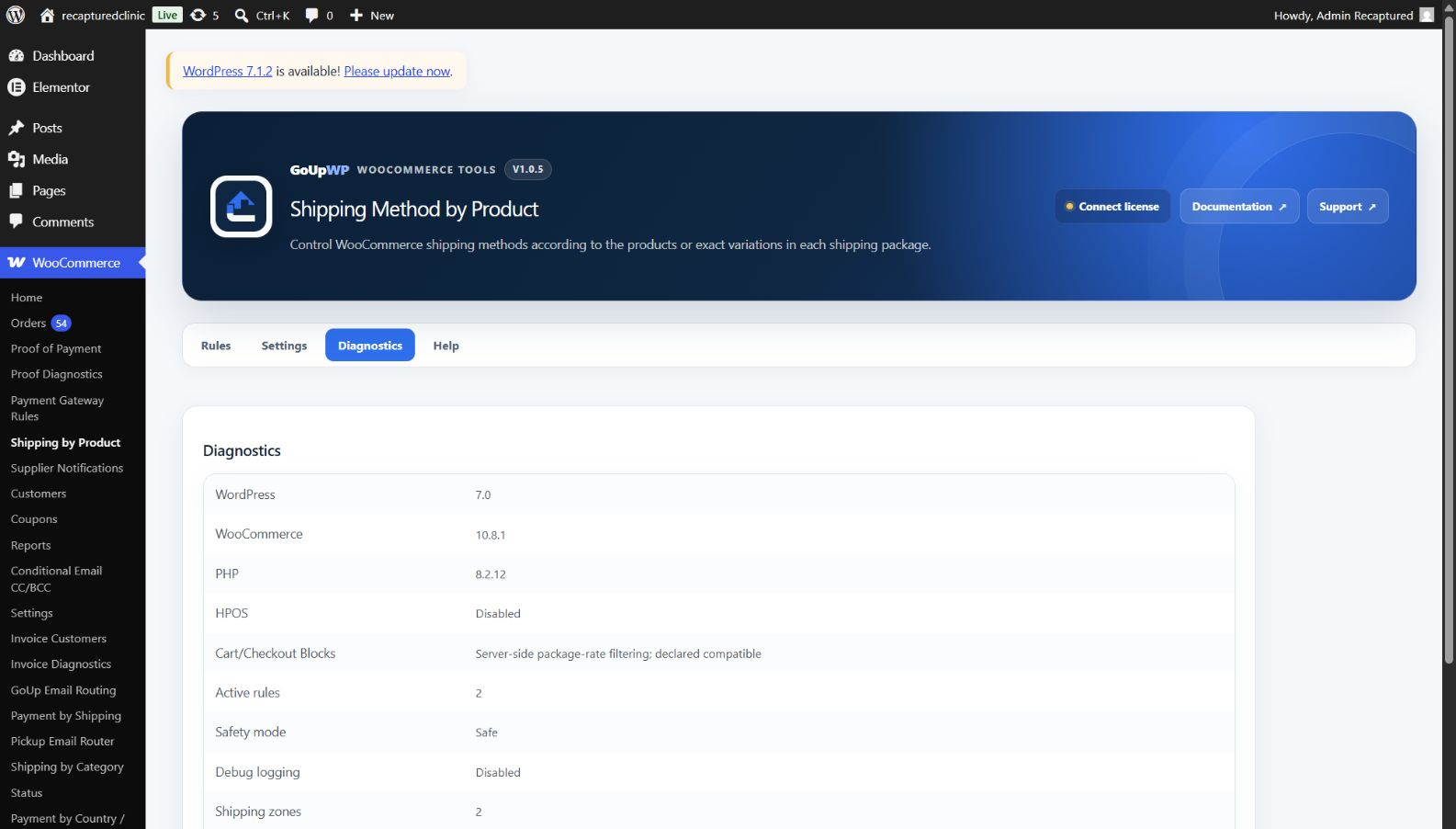
Test on a staging site first, then in an incognito window on production. Add only the restricted product to the cart and confirm the expected methods disappear on the cart page, the classic checkout and the Checkout Block. Then add the product together with a normal item to see how the whole package is treated — with Allow only, the entire package is limited to the allowed methods, which is what most stores want because the fragile or oversized item dictates delivery. Finally change the shipping address to a different zone: instance-based rules only apply where that instance exists, while type-based rules follow the product everywhere. GoUp's Diagnostics tab runs a test cart through every rule and shows which rates it keeps, so a mismatch between "what I meant" and "what I selected" is visible before customers see it.
Related guides
- Disable a shipping method for a product category
- Hide payment methods based on the shipping method
- Route Local Pickup order emails to the right branch
- All WooCommerce shipping plugins
Summary
To disable shipping methods for specific products in WooCommerce, filter woocommerce_package_rates and unset rates when the product or variation is in the package. Test with the product alone, with a mixed cart and with an address in another zone. If product IDs change with imports, merchandisers need to edit the rules, or a wrong rule must never block checkout, keep the rules in an admin screen with a safety mode instead of in functions.php.
Frequently asked questions
How do I make one WooCommerce product local pickup only?
Create a rule with Products = that product, Target = Type: Local pickup (or a specific pickup instance), Action = Allow only. Every other shipping method disappears when the product is in the cart. In code, unset all rates except local_pickup when the product ID is in the package.
Can I disable a shipping method for a single variation but not the whole product?
Yes. GoUp Shipping Method by Product lets you select individual variations (for example only the 'XXL' size). In code compare $item['variation_id'] instead of $item['product_id'].
Is there a WooCommerce product setting to remove one shipping method?
No. The only product-level switch is Virtual, which removes shipping entirely. Shipping classes change Flat Rate pricing but cannot hide a method, so removing one method for one product needs the woocommerce_package_rates filter or a plugin built on it.
Does this work if the cart contains the product plus normal items?
Yes — the rule applies to the shipping package containing the product. With Allow only, the whole package is limited to the allowed methods, which is usually what you want (the fragile item dictates the delivery). Split the product into its own package if you need separate handling.
Will it break my table-rate or carrier plugin?
No. GoUp filters the rates other plugins return; it never calculates or reprices. As long as the carrier plugin returns standard WooCommerce rates with method IDs, its methods can be hidden or allowed like any other.