
What it does
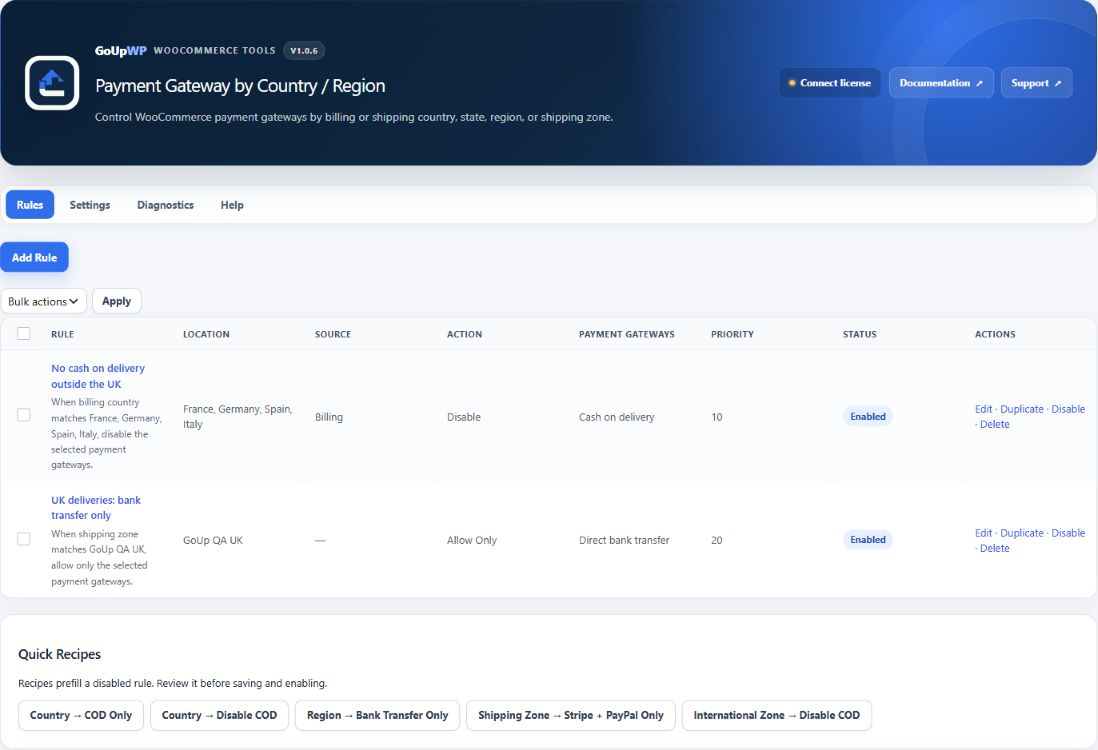
Disable or hide WooCommerce payment methods for specific countries, states, or regions. GoUp Payment Gateway by Country / Region filters WooCommerce’s currently available payment methods using the customer’s billing country, shipping country, state or region, or matched WooCommerce shipping zone. Create Allow Only or Disable rules for local payment methods, bank transfer, Cash on Delivery, and processors that are available only in selected markets.
Step-by-step guide: How to Disable Cash on Delivery (or Any Payment Method) by Country in WooCommerce
Screenshots


Common use cases
- Offer Cash on Delivery and bank transfer only for customers shipping within Pakistan
- Disable a processor in countries it does not support
- Offer a local payment method only for addresses in a selected state or region
- Restrict gateways according to the WooCommerce shipping zone matched by each package
Features
- Match billing or shipping countries and states or regions independently
- Match WooCommerce shipping zones, including Rest of the World
- Allow only selected gateways or disable selected gateways
- Combine rules restrictively by priority without restoring gateways removed elsewhere
- Use default Safe Mode to recover the original gateway set when GoUp rules would remove every option
- Support guest checkout, virtual orders, order-pay flows, Checkout Blocks, Store API, and HPOS
How it works
- Download the plugin ZIP from your GoUpWP account.
- Upload, install, and activate it through Plugins → Add New → Upload Plugin.
- Open WooCommerce → Payment by Country / Region and add a rule.
- Choose a billing, shipping, or zone condition, select Allow Only or Disable and the target gateways, then enable and test the rule.
Compatibility and requirements
Frequently asked questions
How do I disable Cash on Delivery for international orders in WooCommerce?
Create a rule that matches every country except your own (or a specific list of countries) and choose Cash on Delivery as the gateway to hide. Customers outside the allowed countries no longer see COD at checkout.
Does the plugin use IP geolocation?
No. Rules use the billing and shipping destination data WooCommerce already has during checkout. No remote geolocation request is made.
Do shipping rules fall back to the billing address?
No. Billing and shipping locations remain independent. A shipping rule fails open when no shipping destination exists, while a billing rule can still match a virtual-only order.
Can location rules leave checkout with no gateway?
Safe Mode restores the original WooCommerce gateway collection if matching GoUp rules would reduce it to zero. Strict Mode can intentionally keep an empty result.
Can a rule re-enable a gateway removed by another plugin?
No. GoUp only filters the gateways WooCommerce currently considers available and never recreates a gateway removed earlier.
How do rules combine with other GoUp payment-gateway plugins?
Rules combine restrictively across the installed GoUp gateway plugins: Hide removes gateways, and Allow Only intersects the remaining gateway set. A plugin never restores a gateway removed by WooCommerce or another plugin.
Customer reviews
No reviews yet. Reviews come only from customers who hold a license for this plugin.
Updates, support, and cancellation
Every license covers one production website plus one staging or local development site, and includes maintained releases, automatic updates, fresh downloads, and product support during its term. Annual licenses renew automatically until cancelled. Two-year licenses are prepaid and renewed manually; lifetime licenses never expire. If a fixed-term license ends, your installed plugin continues working at its current version.
Changelog
1.0.6 27 September 2026 · tested with WordPress 7.1
- Checkout correctness: cached location and shipping-zone context now invalidates whenever the customer destination or shipping requirement changes within the same request.
- QA: added a real WooCommerce transition gate that changes one cart from France to the configured UK shipping zone and verifies the bank-only rule immediately replaces the prior country result.
1.0.5 27 September 2026 · tested with WordPress 7.1
- Correctness: location filters now run before shipping-zone resolution, and any later context change recomputes zones so country/state and zone rules cannot disagree.
- Security: order-pay location is used only when its order key is valid; debug logs no longer include exact customer country, state or zone IDs.
- Reliability: malformed developer-filter output fails safely, and filters cannot add, restore or replace a gateway WooCommerce did not provide.
- Import safety: exact schema, real upload size, JSON validity and a 500-rule cap are enforced; malformed rows cannot erase working rules and unavailable gateway/location references import disabled.
- Performance: location and shipping-zone context is resolved once per request; rule collections are cached and normalized.
- Admin: truthful bulk/import results, HTTP 403 capability denials, defensive diagnostics and consistent GoUpWP-blue cards, status pills and tester output.
1.0.4 26 September 2026 · tested with WordPress 7.1
- GoUpWP admin identity: every plugin screen now opens with a GoUpWP header showing the plugin name, version, documentation, support and licence status.
- GoUpWP styling for settings, rule tables, tabs, cards and buttons, scoped to this plugin's screens so WordPress and other plugins are untouched.
- GoUpWP mark on the Plugins screen, Documentation and Support links in the plugin row, and GoUpWP icons on the Dashboard → Updates screen.
1.0.3 20 September 2026 · tested with WordPress 7.1
- Updates: the installer now fetches a freshly signed download link at install time and verifies the SHA-256 checksum, so "Update now" works hours after WordPress last checked for updates.
- Updates: update checks are cached for six hours and the Plugins screen shows a clear message (with a link to the license page) when an update exists but the license is not active.
- License screen: named per plugin in the WooCommerce menu, shows the installed version and a "Check for updates" button, and every string is translatable.
- Plugins screen: Settings and License links on the plugin row.
- Uninstall: releases the license seat on goupwp.com and removes all license data, regardless of the data-retention setting.
- Code style: all source files expanded to readable, documented PHP.
- Unit tests covering country, state, zone and priority evaluation plus safe mode.
1.0.2 20 September 2026 · tested with WordPress 7.1
- License screen now explains activation failures (unrecognised key, wrong plugin, site limit reached, expired) and shows the environment, activation counts and end date.
- Activate and Deactivate always contact goupwp.com immediately instead of waiting out a network backoff.
1.0.1 20 September 2026 · tested with WordPress 7.1
- Added the GoUpWP licensing and update client.
- Normalized plugin headers and code style.